Viewing the Pangenome
Node Types

Segments = S lines from GFA files (blue). Links = L lines from GFA files (gray).

A chain of bubbles. Each bubble in the chain is shown in yellow, the chain links are orange.
PangyPlot First displays top-level bubbles. Bubbles can be popped to reveal finer-scale details.
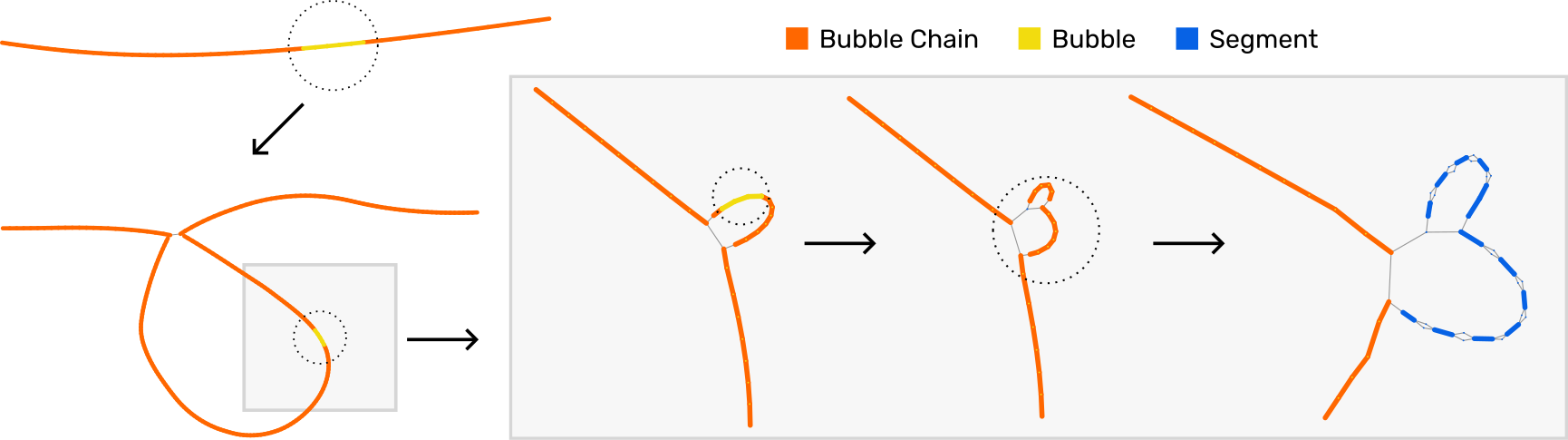
Iterative bubble popping to the segment level.
Gene Annotations
The gene annotations are provided during setup up PangyPlot. The HPRC live instance uses annotations from GENCODE (any GFF3 file can be used).
Annotations are rendered as outlines around nodes and edges:

Example of rendered gene annotations.
Interactions
Pan/Zoom Mode
defaultClick and drag to pan the view. Use mouse wheel to zoom in and out.
Bubble Pop Mode
ctrl key/cmd keyClick nodes to pop bubbles.
Selection Mode
shift keyClick nodes to select. Drag to create a selection rectangle.
Recenter on Subgraph
space barPress the space bar to recenter the view on the full subgraph.
Recenter on Selection
up arrowPress the up arrow key to recenter the view on the selected nodes.
Anchor on Drag
F keyPress the F key to toggle whether a node position is fixed after dragging.