Colors
Color Selection

Color of graph components can be changed.
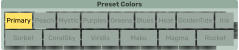
Preset color gradients available for nodes.
PangyPlot provides different methods of coloring the nodes in the visualization. Node colors are selected on a 3-color scale that can form a gradient. Link and background colors can be also be changed. A set of predefined color palettes are available.
Name |
Color 1 |
Color 2 |
Color 3 |
Gradient |
|---|---|---|---|---|
Primary |
||||
Peach |
||||
Mystic |
||||
Purples |
||||
Greens |
||||
Blues |
||||
Heat |
||||
GoldenTide |
||||
Iris |
||||
Sorbet |
||||
CoralSky |
||||
Viridis |
||||
Mako |
||||
Magma |
||||
Rocket |
Note
Some palettes are better for discrete colors and some are better for heatmap gradients. An attempt was made to provide multiple colorblind-friendly palettes but not all of them are guaranteed to be safe.
Color Style
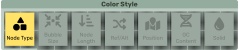
Different coloring styles can be applied to nodes.
Depending on the mode selected, the colors will either be used to form as a continuous gradient or will be used as three discrete colors.
discretecontinuouscontinuousdiscretecontinuouscontinuousdiscrete