Rendering Architecture

PangyPlot renders the graph directly to an HTML <canvas> element
using the 2D drawing API. Layout of bubble and segment subgraphs is
driven by d3-force: D3 runs the
physics simulation that positions nodes, and the app redraws the canvas
on each tick.
Two-Tier Viewer
The viewer has two tiers that hand off as the user zooms:
Skeleton tier — shows the whole chromosome as chain polylines with progressive detail. This is the default view when a region is loaded.
Detail tier — activates as the user zooms into a region. Chains under a complexity threshold are expanded into force-simulated bubble/segment subgraphs anchored to their chain’s polyline endpoints, so they stay visually connected to the surrounding skeleton. Larger chains remain as polylines.
See Chromosome View for the user-facing side of this behavior.
Node Types

Segments = S lines from GFA files (blue). Links = L lines from GFA files (gray).

A chain of bubbles. Each bubble in the chain is shown in yellow, the chain links are orange.
Representing Segment Length
In the detail tier, long GFA segments are split into a series of connected force-simulation nodes joined by thickly drawn links. This gives the illusion of a single long segment while keeping each node small enough for the force layout to position cleanly.
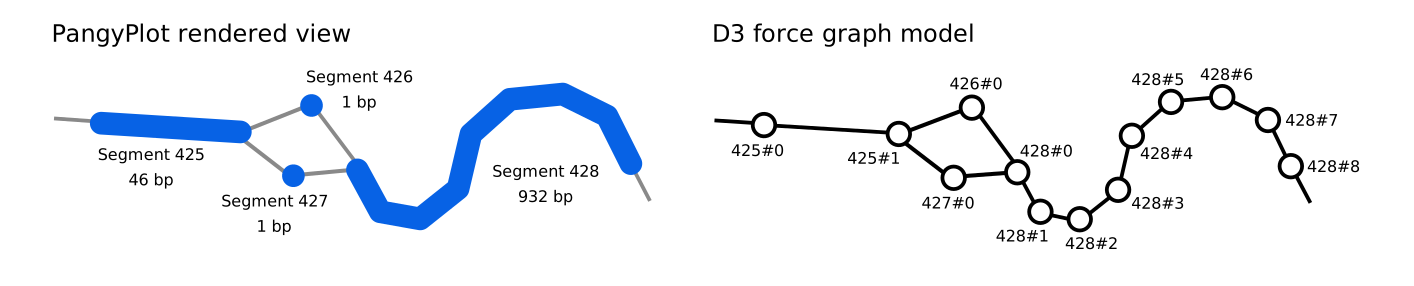
How nodes are implemented.
Force Simulation
The detail tier uses d3-force to position nodes each tick. The core
primitives are d3.forceSimulation, d3.forceLink, and
d3.forceManyBody, configured in
pangyplot/static/js/graph/detail/engines/force-engine.js and
pangyplot/static/js/graph/detail/engines/polychain/polychain-force-engine.js.
Custom forces (anchor gap, chain guide, viewport, polychain-specific)
live in pangyplot/static/js/graph/detail/engines/forces/ and shape
the layout so that expanded chains stay aligned with the surrounding
skeleton polylines.
Codebase Overview
Top-level coordination:
pangyplot/static/js/graph/app.js— viewer entry pointpangyplot/static/js/graph/state.js— canvas, viewport, zoom statepangyplot/static/js/graph/render-manager.js— tier hand-off and draw loop orchestration
Skeleton tier:
pangyplot/static/js/graph/skeleton/data/— data loadingpangyplot/static/js/graph/skeleton/engines/— interaction engines (hover, etc.)pangyplot/static/js/graph/skeleton/render/— canvas draw code
Detail tier:
pangyplot/static/js/graph/detail/data/— data loading and transformspangyplot/static/js/graph/detail/model/— SimObject model, pop/unpop handlerspangyplot/static/js/graph/detail/engines/— force and hover engines; custom forces inengines/forces/pangyplot/static/js/graph/detail/render/— canvas draw code